Managing finances is one of the most critical aspects of running a small business. Without proper accounting software, business owners may struggle with tracking expenses, managing invoices, and ensuring tax compliance. Imagine a small business owner manually entering transactions into spreadsheets, constantly worrying about errors and missing tax deadlines. Now, picture that same business leveraging modern accounting software—automated transactions, real-time financial reports, and seamless tax preparation. This article explores the best accounting software to keep your small business finances in check.
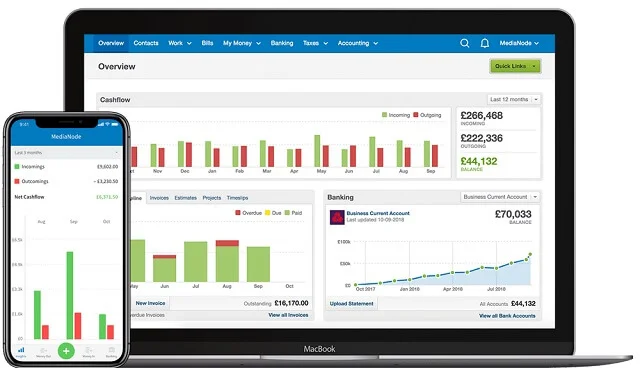
Why Small Businesses Need Accounting Software
Small businesses often face financial management challenges, including:
- Time Constraints: Manual bookkeeping takes valuable time away from core business operations.
- Error-Prone Calculations: Human errors in financial data can lead to significant losses.
- Tax Compliance Issues: Filing taxes accurately and on time is essential to avoid penalties.
- Cash Flow Management: Keeping track of incoming and outgoing funds is crucial for sustainability.
- Scalability: As businesses grow, financial processes become more complex and require automation.
Top Accounting Software for Small Businesses
| Software | Best For | Key Features |
|---|---|---|
| QuickBooks | Comprehensive Accounting | Automated invoicing, expense tracking, tax preparation |
| Xero | Cloud-Based Accounting | Multi-currency support, bank reconciliation, real-time reporting |
| FreshBooks | Freelancers & Service-Based Businesses | Time tracking, invoicing, project-based accounting |
| Wave | Free Accounting Software | Free invoicing, expense tracking, payroll (paid add-on) |
| Zoho Books | Small Business Management | Tax compliance, client portal, financial analytics |
| Sage 50 | Growing Businesses | Inventory management, cash flow forecasting, reporting tools |
| NetSuite | Enterprise Accounting | Cloud-based ERP, advanced financial management, AI automation |
| Kashoo | Simple Accounting for Beginners | Easy-to-use interface, expense categorization, automatic tax calculations |
| Patriot Software | Affordable Payroll & Accounting | Payroll integration, tax filing, expense tracking |
| Bonsai | Accounting for Freelancers | Proposal and contract management, expense automation, financial reporting |
In-Depth Analysis of Each Software
1. QuickBooks – Best for Comprehensive Accounting
QuickBooks is one of the most widely used accounting software solutions for small businesses, offering a range of features to streamline financial management.
- Pricing: Starts at $25/month.
- Key Benefits: Automated bookkeeping, invoice customization, and tax filing.
- Who Should Use It? Small to medium-sized businesses looking for a scalable accounting solution.
2. Xero – Best for Cloud-Based Accounting
Xero is ideal for businesses that need flexible, cloud-based accounting software with multi-currency support.
- Pricing: Starts at $13/month.
- Key Benefits: Bank reconciliation, inventory management, and seamless integrations.
- Who Should Use It? Small businesses with remote teams or international transactions.
3. FreshBooks – Best for Freelancers & Service-Based Businesses
FreshBooks is designed with freelancers and service-based professionals in mind, offering project-based accounting features.
- Pricing: Starts at $17/month.
- Key Benefits: Time tracking, invoicing, and expense management.
- Who Should Use It? Freelancers and consultants needing easy-to-use accounting software.
4. Wave – Best Free Accounting Software
Wave is a budget-friendly accounting solution for small businesses that need basic financial tracking features.
- Pricing: Free (optional paid payroll add-on).
- Key Benefits: Free invoicing, income and expense tracking, and receipt scanning.
- Who Should Use It? Startups and micro-businesses looking for free accounting tools.
5. Zoho Books – Best for Small Business Management
Zoho Books is an affordable yet feature-rich accounting tool designed for small businesses.
- Pricing: Starts at $15/month.
- Key Benefits: GST/VAT compliance, client portal, and automated workflows.
- Who Should Use It? Small businesses needing an integrated financial management system.
6. Sage 50 – Best for Growing Businesses
Sage 50 is a robust accounting solution designed for businesses that require advanced reporting and inventory tracking.
- Pricing: Starts at $34.95/month.
- Key Benefits: Financial forecasting, business intelligence, and tax compliance.
- Who Should Use It? Businesses looking for advanced accounting tools beyond basic bookkeeping.
7. NetSuite – Best for Enterprise Accounting
NetSuite is an enterprise-level financial management tool offering powerful accounting automation.
- Pricing: Custom pricing.
- Key Benefits: AI-powered analytics, cloud-based ERP, and automation.
- Who Should Use It? Mid-to-large businesses that require an all-in-one financial management system.
8. Kashoo – Best for Simple Accounting for Beginners
Kashoo is perfect for business owners looking for an easy-to-use accounting solution.
- Pricing: Starts at $20/month.
- Key Benefits: Automated transaction categorization, simple interface, and tax support.
- Who Should Use It? Small business owners new to accounting software.
9. Patriot Software – Best for Affordable Payroll & Accounting
Patriot Software is a cost-effective solution for businesses needing accounting and payroll features.
- Pricing: Starts at $15/month.
- Key Benefits: Payroll integration, tax filing, and easy expense tracking.
- Who Should Use It? Small businesses needing an affordable accounting and payroll solution.
10. Bonsai – Best for Freelancers
Bonsai is a specialized accounting tool for freelancers offering contract and invoicing features.
- Pricing: Starts at $19/month.
- Key Benefits: Proposal and contract management, automated expense tracking.
- Who Should Use It? Freelancers needing an all-in-one financial tool.
How to Choose the Right Accounting Software for Your Business
When selecting accounting software, consider:
- Your Business Size: Choose a software that matches your financial needs.
- Budget: Some tools offer free versions, while others require monthly subscriptions.
- Features Needed: Consider invoicing, tax support, reporting, and integrations.
- Scalability: Ensure the software can grow with your business.
- Ease of Use: User-friendly interfaces save time and reduce learning curves.
- Customer Support: Access to reliable support can help resolve issues quickly.
Future Trends in Accounting Software
- AI-Driven Automation: More accounting software will integrate AI for predictive analytics.
- Blockchain for Security: Increased use of blockchain technology for secure transactions.
- Mobile-First Accounting: Growing demand for mobile-friendly accounting apps.
- More Integrations: Seamless connections with e-commerce, banking, and tax platforms.
Conclusion
Choosing the right accounting software is essential for small business success. By leveraging automation, real-time tracking, and cloud-based solutions, businesses can enhance efficiency, improve cash flow management, and stay tax-compliant. The right accounting tool not only saves time but also helps businesses make informed financial decisions for sustainable growth.