

A practical guide — from brainstorming ideas to writing captions, designing posts, and scheduling.
Consistency is the single most important factor in social media growth — and it’s also the hardest to maintain. Most businesses, marketing teams, and creators don’t struggle with having ideas. They struggle with the relentless volume of content required to stay visible.
A LinkedIn presence needs posts several times a week. Instagram needs visuals plus captions. A company blog feeds into newsletters that feed into social clips. Keeping up with this output while doing everything else a job requires isn’t a content strategy problem — it’s a capacity problem.
Learning how to use AI for social media content changes that equation. AI tools don’t replace your judgment, brand voice, or strategy. What they do is remove the friction between having something to say and having it ready to post.
From generating a week’s worth of content ideas to writing platform-specific captions, producing supporting visuals, and scheduling posts for optimal times, AI now handles most of the production layer of social media management.
This guide is built for corporate teams, HR departments, startups, marketing professionals, and creators who want a practical, end-to-end workflow — from a blank page to a live post, with far less manual effort than traditional content production. By the end, you’ll have a repeatable system that makes consistent social media content genuinely sustainable.
Quick Summary
- AI for social media works best as a production system, not just a writing shortcut
- A full AI-assisted workflow covers ideation, writing, visuals, scheduling, and performance review
- Platform-specific output is essential — LinkedIn, Instagram, and X each require different tone, length, and format
- Maintaining a human voice requires active editing, not just prompt-tuning
- The biggest time savings come from building reusable templates and content calendars, not from writing individual posts on demand
- Most businesses can reduce social media production time significantly while maintaining or improving content quality
What You’ll Learn
- A complete, repeatable AI workflow from idea to post
- How to generate content ideas and build a content calendar with AI assistance
- How to write platform-specific captions for LinkedIn, Instagram, and X
- How to use AI for supporting visuals alongside written content
- How to schedule and monitor AI-produced content effectively
- What separates AI-assisted content that performs from content that feels generic
Tool Overview
For this guide, the primary tools are ChatGPT and Canva — a pairing that covers the two core components of social media production: the written layer (captions, scripts, copy) and the visual layer (graphics, templates, images).
ChatGPT handles ideation, caption writing, hashtag strategy framing, content calendar planning, and copy refinement.
Canva’s AI features — including Magic Write, AI image generation, and its built-in scheduling integration — handle visual production and post-ready design within a single platform.
Together, they cover the full content creation cycle without requiring a separate design tool, scheduling app, or copywriting service.
ChatGPT — Key Features for Social Content
- Content ideation for any niche, industry, or audience
- Platform-specific caption writing (LinkedIn, Instagram, X, Facebook, TikTok)
- Caption variations and A/B test options from a single content idea
- Hashtag strategy framing and suggestions
- Content calendar planning and content pillar development
- Brand voice calibration through custom instructions
Canva — Key Features for Social Visuals
- AI image generation and text-to-graphic tools
- Template library with platform-specific dimensions for every major channel
- Magic Write AI for caption drafting directly within designs
- Brand Kit for consistent colors, fonts, and logos across all content
- Built-in scheduling for direct publishing to connected social accounts
Why Businesses Use These Tools
AI social media content tools dramatically reduce the time from content brief to ready-to-post material. They enable small teams to maintain a consistent multi-platform presence without additional hires, allow rapid content creation around trending topics or time-sensitive announcements, and free marketing staff from repetitive production work to focus on strategy and engagement.
Step-by-Step: How to Use AI for Social Media Content
Step 1 — Define Your Content Pillars and Audience
Without defined content pillars — the recurring themes your brand posts about — AI will produce content that’s technically correct but strategically directionless. Pillars give every piece of content a purpose and ensure your feed tells a coherent story over time.
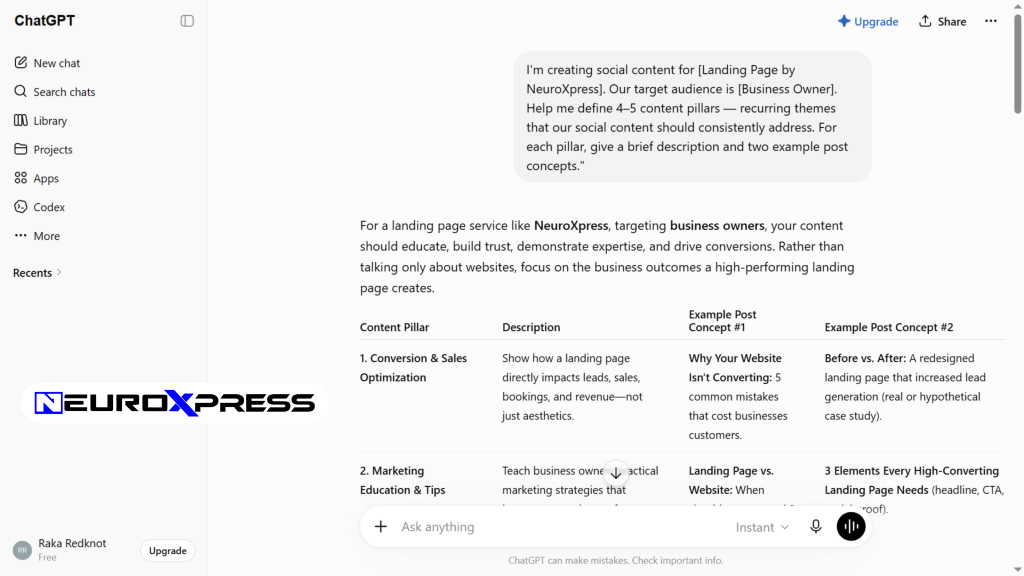
What to do: Open ChatGPT and prompt: “I’m creating social content for [describe your business/brand]. Our target audience is [describe them]. Help me define 4–5 content pillars — recurring themes that our social content should consistently address. For each pillar, give a brief description and two example post concepts.”
Review the suggested pillars, adjust any that don’t fit your brand’s actual priorities, and save the final list.
Expected result: A defined content strategy framework of 4–5 pillars that every piece of AI-generated content maps back to — giving your feed strategic coherence rather than random variety.
Step 2 — Build a Content Calendar with AI Assistance
Batch-creating content on a calendar — rather than writing individual posts one at a time — is the efficiency shift that makes consistent posting sustainable. Planning a week or month at once, with AI, replaces daily decisions about what to post with a single focused session.
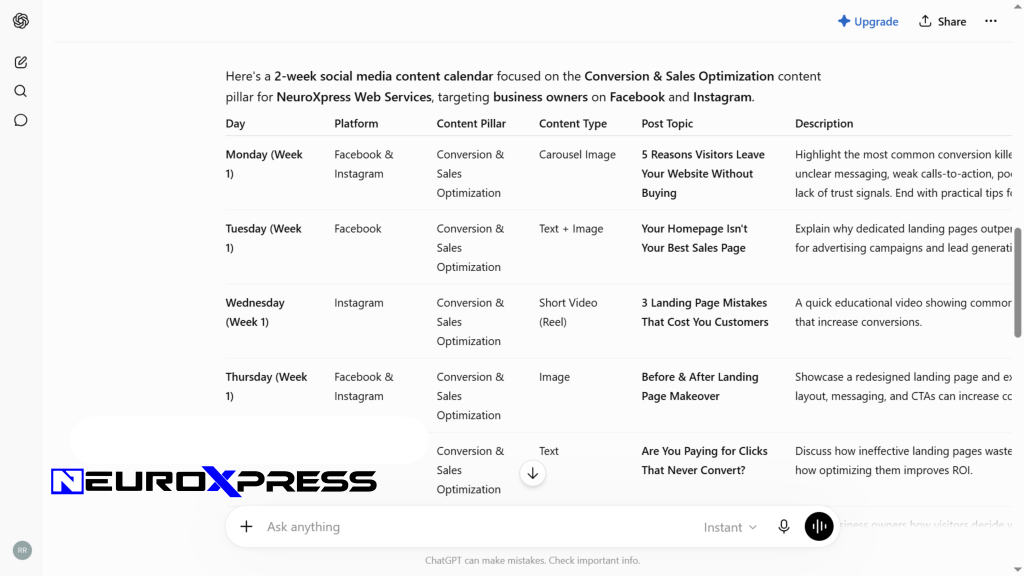
What to do: Prompt ChatGPT: “Create a 2-week social media content calendar for [business type] across [platforms: LinkedIn and Instagram]. Map each post to one of these content pillars: [list them]. Include post topic, platform, content type (text, image, video), and a short description of what the post will cover.”
Review the calendar, adjust posting frequency to match your capacity, and use it as your production roadmap.
Expected result: A structured 2-week content calendar that maps every post to a pillar, specifies the platform and format, and tells you exactly what to produce — replacing open-ended planning sessions.
Step 3 — Write Platform-Specific Captions
What works on LinkedIn doesn’t work on Instagram. A professional, paragraph-heavy post that performs well with a business audience reads as tone-deaf on a visual-first platform. Platform-specific writing is one of the fastest ways to improve engagement — and one of the most common things AI gets wrong without specific instruction.
What to do: Using the content calendar as your brief, write platform-specific captions for each post:
- LinkedIn: “Write a LinkedIn post about [topic]. Audience: business professionals. Tone: professional but warm. 150–200 words. End with a question to encourage comments.”
- Instagram: “Write an Instagram caption for [topic]. Tone: conversational and engaging. 80–100 words. Start with a hook on the first line. Add 10 relevant hashtags at the end.”
- X (Twitter): “Write a sharp, engaging tweet about [topic]. Under 260 characters. No hashtags unless essential. Hook is everything.”
Generate 2–3 variations for each post to choose from or test.
Expected result: Ready-to-edit captions for each planned post, already formatted and toned for the specific platform — requiring light editing rather than full rewrites.
Step 4 — Create Supporting Visuals in Canva
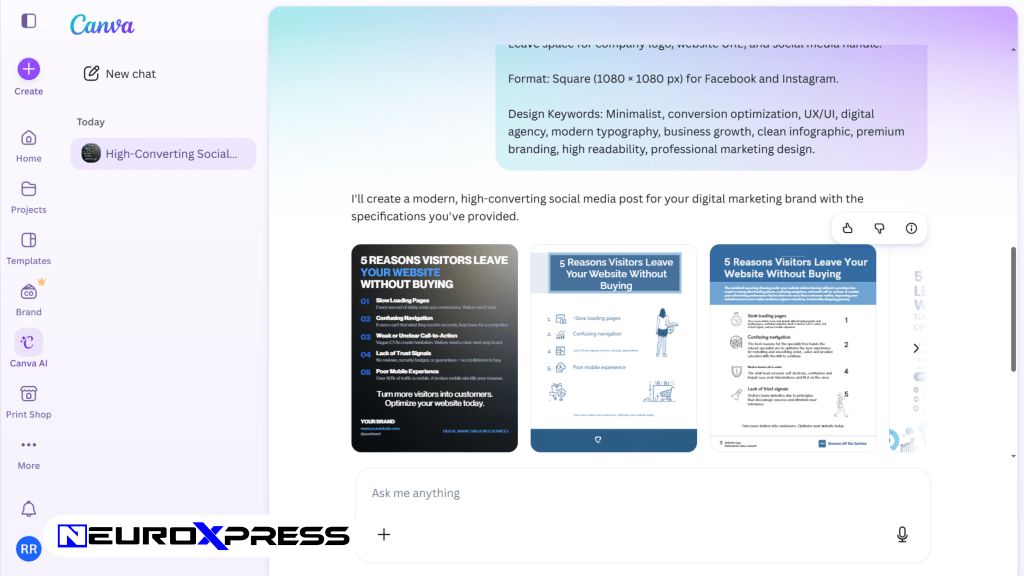
Written captions without strong visuals underperform on every visual-first platform. AI-assisted design in Canva allows non-designers to produce on-brand graphics quickly, using AI image generation and template-based production rather than designing from scratch.
What to do:
- Open Canva and search for a template matching your post format (Instagram square, LinkedIn portrait, X landscape)
- Customize the template with your brand kit colors and fonts
- Use Magic Write to draft any text overlay directly in the design
- For a custom image, use Canva’s AI image generator with a specific description — for example: “minimalist illustration of a team collaborating, flat design, blue and white”
- Pair each caption with its matching visual and save as a ready-to-post set
Expected result: A complete set of branded, platform-sized visuals paired with their AI-written captions — ready to review as a finished content batch.
Step 5 — Edit for Brand Voice Before Scheduling
AI-generated content has a recognizable neutral quality — professional and clear, but often generic. The edit pass is where brand voice enters the content and where you add the specific references, examples, and personality details that make posts feel genuinely yours.
What to do: Review each piece of content and make targeted edits:
- Replace generic examples with specific, real ones from your business or industry
- Rewrite the opener — AI openers often start slowly; make the first sentence earn attention
- Add your own perspective or opinion where the post allows for it
- Remove phrases that feel corporate or clichéd, even if they’re technically correct
- Ensure hashtags are relevant and current for your specific niche, not just generic topic tags
You can also ask ChatGPT to assist: “Review this post and flag any parts that sound generic or could apply to any business. Suggest more specific alternatives.”
Expected result: A batch of posts that sounds like your brand wrote them, with AI handling the structure and production layer and your voice shaping the final character of each piece.
Step 6 — Schedule Posts
Scheduling separates the creation session from the distribution moment, allowing you to work in focused production batches and post at optimal times — rather than scrambling to produce content the day it needs to go live.
What to do: Use Canva’s built-in content scheduler (for direct publishing to Instagram, Facebook, and LinkedIn), or connect your content to a dedicated scheduling tool like Buffer or Later:
- Upload your finalized caption and visual pairs
- Set posting times based on your platform’s audience activity data
- Review the scheduled queue to confirm everything looks correct in context
- Set a reminder to engage with comments in the hour after each post publishes
Expected result: A full week or two weeks of content queued and ready, publishing automatically at the right times — with your active time freed up for engagement and strategy rather than manual posting.
Step 7 — Review Performance and Refine Your System
AI-generated content benefits from the same performance feedback loop as any social media strategy. What performs well informs your next calendar; what underperforms tells you where to adjust your pillars, formats, or platforms.
What to do: After two weeks of publishing, pull basic performance data from each platform (impressions, engagement rate, click-through) and return to ChatGPT:
“Here are the performance results from my last two weeks of content. Which content types or pillars performed best? Suggest three adjustments to my next calendar based on this data.”
Use the insights to refine your pillars, posting frequency, or format mix before building the next batch.
Expected result: A continuously improving content system that gets more targeted and efficient with each production cycle — not a static template that produces the same results indefinitely.
How Different Teams Use AI for Social Media
Startups — Early-stage founders use AI to maintain a consistent social presence while managing a full operational workload, producing professional content that builds brand awareness without dedicating significant time to production.
Agencies — Social media agencies use AI to manage high-volume content production across multiple client accounts simultaneously, maintaining distinct brand voices for each client while dramatically reducing per-post production time.
Marketing Teams — In-house teams use AI to build content calendars for product launches, campaign moments, and ongoing brand presence — with AI handling first drafts that human strategists review and refine before publishing.
HR Departments — HR teams use AI to create employer brand content: behind-the-scenes culture posts, job opening announcements, and employee spotlight concepts for LinkedIn, helping attract talent through a consistent, professional social presence.
Creators — Individual creators use AI to maintain output across multiple platforms — drafting cross-platform versions of each piece of content so a single idea becomes a LinkedIn summary, an Instagram carousel concept, and a short-form video script.
Enterprise Teams — Large organizations build AI content workflows into their brand systems, enabling regional teams or employee advocates to create locally relevant content within brand guidelines, supported by AI-generated templates and copy frameworks.
Best Practices
Create platform-specific prompts for each channel. Store a saved prompt for LinkedIn, one for Instagram, and one for X that includes platform norms, tone, and format requirements. This eliminates the need to explain the format difference every time.
Batch-create content in single focused sessions. Producing two weeks of content at once — a single 90-minute session — is significantly more efficient than writing individual posts daily, and produces more coherent, strategically consistent output.
Always lead with a strong first line. On every platform, the opening line determines whether anyone reads the rest. Edit AI openers aggressively — the default first lines tend to be too slow or too generic to earn the scroll.
Keep a swipe file of your best-performing posts. When a post performs significantly above average, save it. Share it with your AI tool: “I want future posts in the style and format of this one.”
Generate multiple variations, not just one. For important posts, always generate at least two or three variations and choose the strongest — or test them if your volume allows for A/B testing.
Review content as a batch before scheduling. Reading a full week’s content at once reveals patterns that individual review misses — tone drift, repetitive phrases, or over-reliance on a single content pillar.
Common Mistakes to Avoid
Publishing AI content without editing. Unedited AI captions are detectable — not because they’re bad, but because they’re missing the specificity, personality, and cultural references that make content feel human and trustworthy. The edit is essential.
Ignoring platform differences. Generating one piece of content and copying it identically to every platform is the fastest way to underperform on all of them. Each platform needs its own adapted version.
Overusing hashtags. AI tends to generate hashtag lists indiscriminately. On LinkedIn and X, hashtag use is minimal and strategic — large blocks of hashtags can reduce performance. On Instagram, hashtags are more functional. Match usage to platform norms.
Letting content volume outpace engagement. More posts don’t automatically produce more growth. Replying to comments, engaging with your audience’s content, and being present in conversations matters as much as publishing volume.
Skipping a brand voice review. Even with great prompts, AI content benefits from a final read-through by someone who knows the brand deeply. This is especially important for client work or externally facing brand accounts.
Treating the content calendar as fixed. Trending topics, news events, and audience moments often create better engagement opportunities than the best-planned evergreen content. Leave room in your calendar for timely posts alongside planned ones.
Frequently Asked Questions
Can AI really write good social media captions?
Yes, for the structural and initial draft layer — but “good” still requires human editing. AI excels at producing captions that are clear, correctly formatted, and strategically relevant. What they often lack without editing is the specific voice, real examples, and personality that make a brand’s content distinctive.
How do I make AI-generated content sound like my brand?
Use ChatGPT’s custom instructions to describe your brand voice — for example, “conversational and direct, like a knowledgeable peer rather than a corporate brand.” For each content batch, also include 2–3 examples of your existing best-performing posts and ask AI to match that style.
Is there a risk of AI content feeling generic or getting flagged?
Generic content risks underperforming due to low engagement — social algorithms favor content that gets genuine responses. AI-generated content isn’t specifically flagged or penalized by platforms as of 2026, but audience recognition of generic content can reduce engagement and, by extension, algorithmic reach. Human editing significantly reduces this risk.
How many posts can I realistically batch-create in one session?
A focused 60–90 minute session using this workflow can typically produce 10–14 posts for two platforms — enough for a full two-week calendar. This includes calendar planning and caption drafts, with the editing step adding another 30–45 minutes.
Should I disclose that my content uses AI assistance?
Current platform terms don’t require disclosure of AI-assisted content creation. Some creators and brands choose to be transparent about their use of AI tools, which can itself be a content strategy — audiences increasingly appreciate honesty about workflow.
What platforms does AI social content work best for?
AI-assisted content works well for text-heavy platforms like LinkedIn, X, and Facebook, where written quality drives engagement. For Instagram, it handles caption writing and can assist with visual concepts. For TikTok and short-form video, AI is most useful for scripting and description writing rather than the video content itself.
Alternatives to Consider
Buffer (with AI features) — A social media scheduling tool with built-in AI writing assistance for caption drafts and posting time optimization. Best for teams that want AI writing assistance and scheduling in one place without managing two separate tools.
Hootsuite (with OwlyWriter AI) — An enterprise scheduling platform with a built-in AI writing tool designed specifically for social media captions, integrated with its multi-account management features. Best for larger teams or agencies managing multiple accounts.
Later — A visual-first scheduling platform with a link-in-bio tool and AI caption suggestions, particularly popular with Instagram-focused brands. Best for brands that prioritize a visual content calendar and want scheduling tightly integrated with visual planning.
Jasper — A dedicated AI writing platform with templates specifically designed for social media captions across multiple platforms, with stronger brand voice customization than general-purpose AI tools. Best for agencies or marketing teams that need tighter brand voice control across multiple clients.
Adobe Express — Adobe’s simplified design tool with AI features for social media graphics, tightly integrated with Adobe Creative Cloud. Best for teams already embedded in the Adobe ecosystem who want a simpler design tool with AI features alongside their existing creative workflow.
Key Takeaways
- AI for social media works best as a full production system — ideation through scheduling — not just individual caption writing
- Defining content pillars before generating content is what separates strategic AI-assisted social media from random AI output
- Platform-specific caption writing is essential and requires explicit prompting — the tone, length, and format for each channel differ significantly
- The edit pass for brand voice is non-negotiable: AI generates the draft, humans add the specificity and personality
- Batch-creating two weeks of content in a single focused session is the workflow shift that makes consistent posting sustainable
- Performance review and calendar refinement create a content system that improves over time rather than plateauing
Conclusion
Learning how to use AI for social media content isn’t about automating everything and removing the human from your brand’s voice. It’s about removing the time-consuming production layer — the blank page, the format decisions, the design friction, the daily scramble — so the human parts of your content strategy can actually get done.
This guide has walked through a complete, repeatable workflow: defining pillars, building a calendar, writing platform-specific captions, creating visuals, editing for voice, scheduling, and refining based on performance. Each step is practical and implementable without specialist skills or expensive tools.
For marketing teams stretched across multiple priorities, startups building a brand presence with a small team, HR professionals managing employer brand accounts, or creators trying to show up consistently across platforms — this workflow gives you back the time that content production currently takes, without trading quality for it.
Pick one platform you want to show up on more consistently. Use the steps in this guide to build your first two-week content batch. The first production session takes the longest — by the second or third, the workflow becomes fast enough that “not having time for social media” starts to feel like an excuse that no longer applies.


